Production deployment
One Kubernetes cluster, two Helm releases, and the node-pool rules that are not negotiable.
A production deployment is one Kubernetes cluster with two Helm releases. Terraform quickstarts for GCP and AWS create everything around the cluster in one apply and render the Helm values you need. This page is the shape; Deploy on GCP and Deploy on AWS are the step-by-step bring-ups.
The two releases
Section titled “The two releases”The engram release is the control plane. It runs the coordinator as a stateless
Deployment with as many replicas as you like, the orchestrator, and nginx serving the
dashboard. The coordinator talks to Postgres (Cloud SQL or RDS), the blob store (GCS or S3),
and the cloud’s secret manager. It never owns a VM and has no public address. The
orchestrator is the login wall: the web Ingress in front of it is the only public surface of
the deployment.
The engram-host-fleet release is the Firecracker hosts. It runs the host agent as a
privileged DaemonSet on a dedicated node pool with nested virtualization, in a namespace that
enforces the privileged pod security level. A node-prep DaemonSet loads the NBD module, sets
the sysctls, and mounts the memory substrate; an init container stages Firecracker, the guest
kernel, and the session bundles on each node. The same release runs the fleet operator,
which rolls hosts one at a time after draining them and scales the node pool from the
coordinator’s queue.
The DaemonSet’s update strategy is OnDelete on purpose. Kubernetes never rolls these pods;
the operator does, node by node, and a roll reattaches to running VMs rather than killing
them.
Host agents register with the coordinator’s in-cluster Service over HTTP. There is no inbound connection to a host and no internal load balancer.
The node pool
Section titled “The node pool”The KVM node pool has rules that come from incidents, not taste.
- Intel only. Nested virtualization is Intel-only on every managed provider, set when the pool is created, and incompatible with node auto-provisioning. GKE: the C3 family, on a Standard cluster. EKS: m8i, or bare metal.
- One CPU platform per fleet. A base snapshot captured on a newer CPU never restores on an older one. The quickstarts pin one platform per cloud; moving a fleet to an older platform means re-enabling every image.
- The operator owns the pool’s size. Terraform seeds it and then ignores it. Never attach a cluster autoscaler to the KVM pool.
- The pool’s label and taint, the privileged namespace, and auto-upgrade off are invariants the charts and modules assume.
Blob store, secrets, and the master key
Section titled “Blob store, secrets, and the master key”The blob store is a GCS bucket or an S3 bucket, provisioned by Terraform and named in the Helm values. Firecracker memory snapshots are multiple gigabytes and stream through without being held in RAM.
Secrets that sessions use come from the cloud’s secret manager, resolved when a session is created, with the coordinator’s identity (Workload Identity on GKE, IRSA on EKS). There are no key files.
The coordinator envelope-encrypts registry credentials and per-session secret bundles under a master key. On GCP that key is 32 random bytes kept in Secret Manager and relayed into the coordinator’s Secret; on AWS it is a KMS key and no key material ever reaches a pod. A missing or wrong master key fails the coordinator at boot, on purpose: running without one would write rows nobody can decrypt. The choice of provider is made when a deployment is created and cannot be flipped later.
The egress proxy
Section titled “The egress proxy”Every host runs a proxy that intercepts each VM’s TLS on port 443 and its DNS, and enforces the allow-list from the session’s profile. It is mandatory. Every host loads the same certificate authority so a session that migrates keeps trusting its new host; the configuration reference covers how each cloud delivers the CA pair to hosts, which differs because host-agent pods share the node’s network. One transport-layer bypass exists by construction: if you allow a DNS-over-HTTPS endpoint, guests can resolve names through it. Do not allow-list one.
Health
Section titled “Health”The coordinator serves /healthz, which is 200 whenever the process is up, and /readyz,
which is 200 only when Postgres answers. Wire the liveness probe to the first and the
readiness probe to the second, so a coordinator that lost its database leaves the load
balancer instead of serving errors. The charts do this.
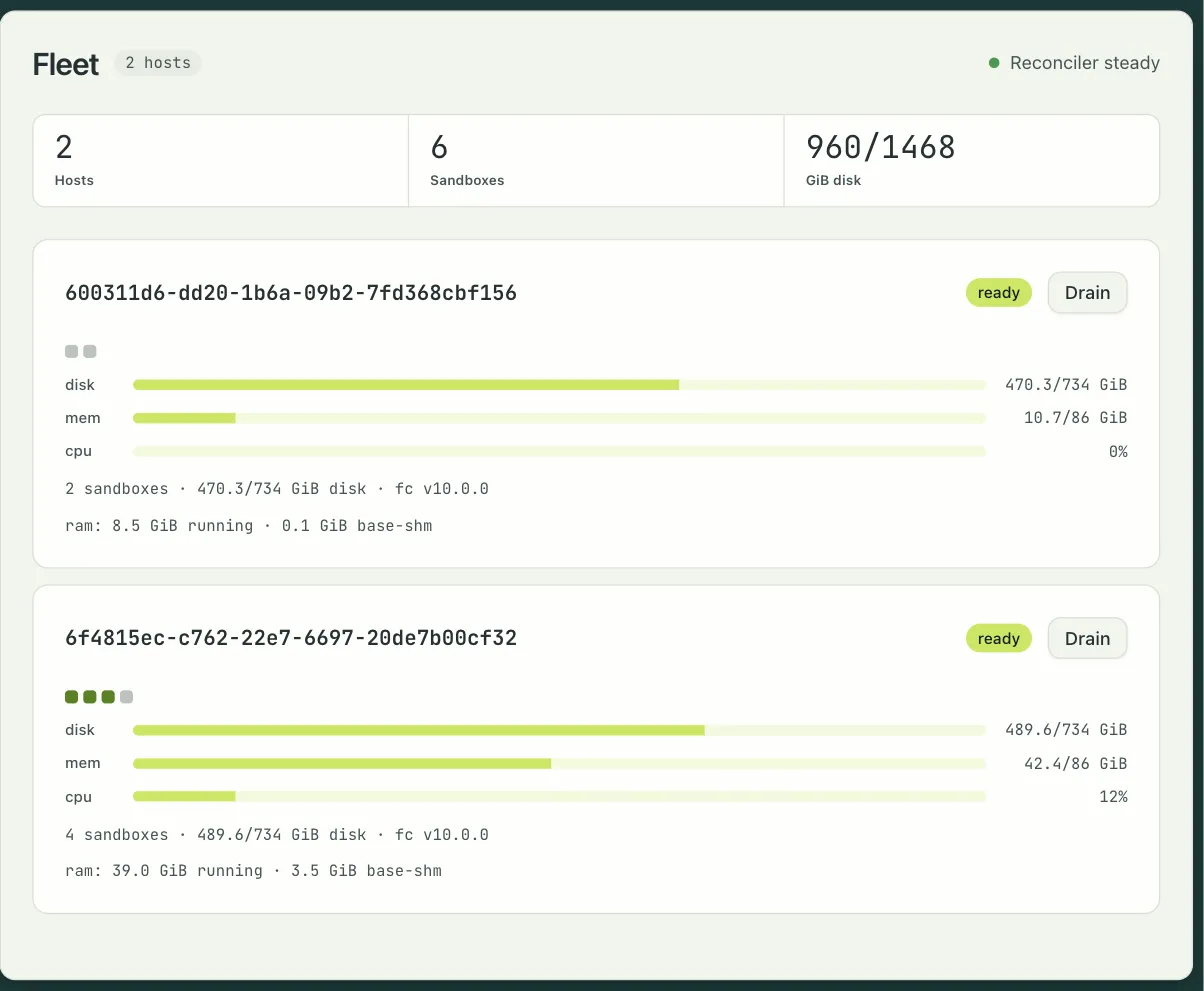
The dashboard’s Settings › Fleet page is the view for whoever runs the fleet: each host’s status, disk, memory, CPU, and sandboxes, and a Drain button that moves its sessions elsewhere. Settings › Storage shows snapshot durability per sandbox. When a host drains or goes offline, the Fleet row in the Settings rail says so from any page.