Egress and secret brokering
Every VM's traffic goes through a proxy on its host; credentials are injected there, so an agent can call an API without ever holding the key.
An agent in a session can reach the network only through a proxy on the host that runs its VM. The proxy decides, per session, which hosts are reachable, and for the services you have connected it inserts the credential into each request on its way out. The VM never holds a key it could leak, log, or commit.
How traffic leaves a VM
Section titled “How traffic leaves a VM”There is no proxy setting inside the VM and nothing for an agent to bypass. The host redirects every VM’s TLS on port 443 and its DNS to the proxy, and drops everything else: other ports, other VMs, and the private address ranges. A session’s policy is registered with the proxy before its agent starts, so no request can slip out ahead of it.
For a DNS query outside the allow-list the proxy answers as if the name did not exist. For a
TLS connection to a host that is not allowed, it closes the connection without sending a
byte, so a blocked call never looks like a success to the agent; curl reports an empty
reply. Responses from allowed hosts pass through unchanged, so an upstream 401 is a 401.
The proxy is a node-local daemon that outlives the host agent, so a host roll or an upgrade does not cut a session’s open streams to a model API.
What a session may reach
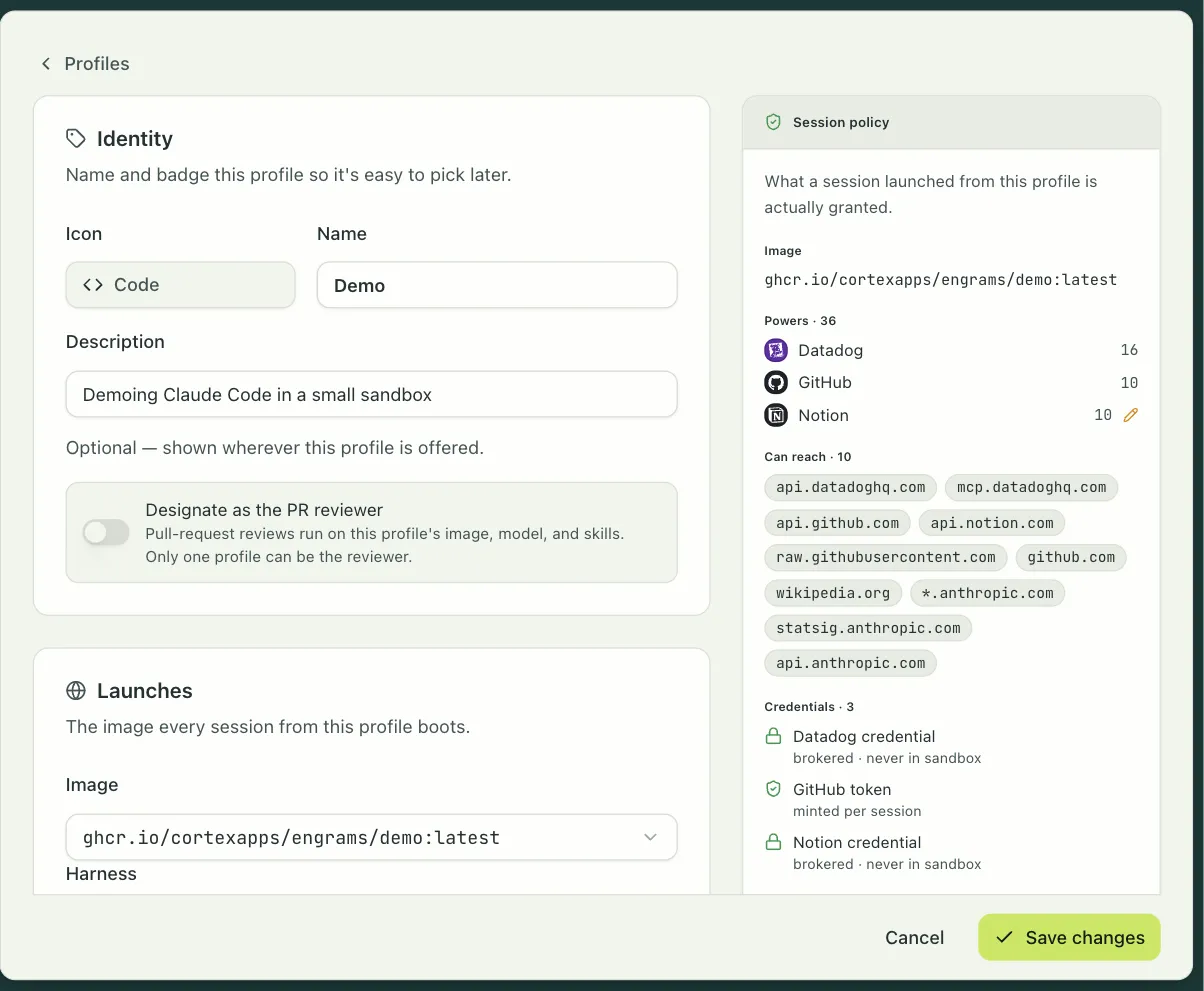
Section titled “What a session may reach”The policy comes from the profile. New profiles deny by default, and most of what a session needs is opened for it:
- The harness declares the hosts it must reach, the model API and its telemetry, and they are merged in.
- Every integration the profile grants opens that service’s hosts.
- Anything else goes under Add extra hosts in the profile editor’s Network section:
exact hostnames, or patterns with one leading wildcard label such as
*.githubusercontent.com.
The profile editor shows the result beside the form, and the task composer shows the same receipt before a person launches. A block in an automation can narrow a session further, to a deny-by-default network with no profile secrets, which is how the pull request reviewer runs.
Two things are refused regardless of the allow-list. The Google credential-exchange
endpoints are blocked even under a broad *.googleapis.com pattern, because a service
account key that reached them could mint tokens the policy never granted. And if you allow a
DNS-over-HTTPS resolver, VMs can resolve any name through it, so do not.
The proxy sees the hostname at the start of each TLS connection and takes one of two paths. An allowed host with nothing to broker is passed through as an opaque byte stream: the proxy never decrypts it. A host with a brokered credential is terminated at the proxy with a certificate minted for that hostname and signed by a certificate authority every session image trusts. The authority is the same across the whole deployment, so a session that migrates to another host keeps trusting the proxy there; the deployment guides cover where its key lives on each cloud.
Brokered credentials
Section titled “Brokered credentials”A connector describes a service: the hosts it lives on, the header that carries its credential, and the operations an agent may perform, as HTTP method and path patterns or as GraphQL operations. engrams ships two dozen and you can add your own.
When a profile grants a connector, the credential stays sealed in the org secret store. At session start the coordinator unseals it and hands it to the host’s proxy along with the policy. Each matching request is rewritten on the way out: the proxy strips any header of the same name the agent supplied and inserts the real one. A request to a connector’s host whose shape matches none of its operations is refused. Inside the VM, a connector’s CLI runs with a placeholder token that the proxy replaces; the agent is told not to log in.
A profile secret works one of two ways. Literal puts the value in the session’s environment. Broker puts a placeholder there and substitutes the value at the proxy, only on the hosts that secret is allowed to reach; a placeholder that appears in a request to any other host drops the connection.
Credentials that expire, such as OAuth tokens and the GitHub App’s installation tokens, are refreshed by the proxy itself before they go stale.
Whose credential
Section titled “Whose credential”A profile grant can name the organization’s connection or the launching person’s own. With the second, a session started by a person who has connected their Slack, GitHub, Linear, Sentry, or Cortex account runs those integrations as them, and a session by someone who has not gets those integrations switched off, never the org credential. Sessions started by a schedule or a webhook always use the organization’s. A disconnected personal account stops working in live sessions within a day.
What you can see
Section titled “What you can see”The host logs every brokered request: the session, the host, the method, the path without its query string, and whether it was allowed, never the credential or the body. Side effects on connected services surface in the session’s transcript as integration events, so a pull request or a Slack message an agent created is visible where the conversation is.
Capture VMs
Section titled “Capture VMs”The VM that runs an image’s warm hook gets a policy of its own, set with the hook: no network by default, an allow-list, or open egress for a development image where no agent runs. It never gets brokered credentials; the warm capture env is its only secret-bearing input.
Custom connectors
Section titled “Custom connectors”Settings → Integrations → Add a custom connector takes a provider slug, a category and an icon, the hosts it opens, one or more credential headers with their templates and the org secret each one reads, the operations as method and path patterns or GraphQL operations, and optionally a CLI binary to stage into sessions that grant it. The token is sealed as an org secret and injected at the proxy like the built-ins. A custom connector cannot replace a built-in one.